12.29.2009

Google's Chrome OS-powered netbook specs leaked


As they announced their new operating system, Chrome OS, Google also told us that we would have to buy certain hardware to get it. They said that the machines would be similar to today's netbooks. However, that was about all we knew about Chrome OS clients. Until now.

News has now leaked about Google's Chrome OS netbook, and it sheds a bit of light on what the machine will be like. Here are the specifications of Google's Chrome OS machine:

  • 10.1-inch high-definition display with multi-touch input 
  • NVIDIA Tegra graphics card 
  • 2 GB of RAM 
  • 64 GB SSD 
  • Wifi, Bluetooth and 3G radios 
  • USB sockets 
  • Ethernet jack 
  • 3.5 mm audio output 
  • webcam 
  • 4 or 6 cell battery 
  • optional GPS radio 
These are quite impressive features for a netbook, namely the 64 GB SSD. But the real kicker is the price, which is slated to be under $300 and maybe even around $200. That's very competitive compared to current netbooks. And it will probably need to be by the time it is released next year (2010). It is also believed that Google will sell the Chrome OS netbook through their own website.

So what do you think? Is this a deal that would entice users to leave Windows XP behind? Or is Chrome OS not all it's cracked? Let us know in the comments!

12.18.2009

Google looking to make their own Chrome OS netbook


If you follow the Internet-bred rumours, then you might be looking forward to a supposed Google-released Chrome OS netbook. This differs from previous assumptions that Chrome OS netbooks will be produced and badged by computer manufacturing companies. For example, we were expecting netbooks made by the likes of MSI and Dell, or even the first announced Acer Chrome OS netbook. We didn't expect Google to contract out their own machine build and make a "Google Netbook". However, that is exactly what some recent whisperings are pointing to.

I see this as the perfect long-run marketing move by the search engine company. If Google wants something that people will be flocking to buy, they need to make it perfect. And what better way to make the perfect netbook than tightly controlling how it is built? If Google makes their own Chrome OS netbook, they will be able to dictate exactly how it is made and how it runs. They won't have to rely on HP or ASUS to make a netbook that runs Chrome OS like a champ.

This is a page straight from the book of Apple. The Cupertino-based company has never let another computer manufacturer make a Mac computer. There has never been an officially backed machine running Mac OS that wasn't completely planned out by Apple. And look where they are now: Leading desktop computer sales in October of 2009. And I dare you to find me a Mac doesn't run Mac OS perfectly. This is the future of a Google netbook running a Google operating system.

So what do you think? Is a Google-produced Chrome OS netbook a good idea? Or will the Google end up crawling back to what it does best, powering your searches and serving ads? Let us know in the comments?

12.13.2009

Opera wants to put their browser in Chrome OS


It's obvious that Chrome OS will be (and already somewhat is) revolutionary to the world of computers. The operating system from Google will change the industry drastically if it gains popularity, and it looks like it will. However, there are still a few missing pieces of the puzzle for some users.

For example, what if I want to run an application that isn't a web application? What if I don't really want to use the Chrome web browser? Chrome is quick and efficient, but some people are accustomed to another browser and don't want to change. Well, Opera's chief standards officer, Charles McCathieNevile, says that won't be a problem, especially if you want to user the Opera browser instead of Chrome.

Opera says that they will be able to stick their browser in Chrome OS as an addon to Chrome. Then users will be able to use their familiar Opera browser functions and still enjoy a solid, fast Chrome OS. Opera seems to be doing exactly what software companies should do when the face of their industry changes. And that is develop new ways to remain part of the computing equation. Instead of shouting that Chrome OS will be a failure, why not stick your product or service in it and continue on with life?

So what do you think? Let us know in the comments!

12.04.2009

Chrome OS Updated (Cherry Version)


Our faithful beast of a hacker, hexxeh, has come through again. And this time, it's you Broadcom wireless users that are in for joy.

Hexxeh announced his new Chromium OS build today, stating that "ChromeOS Cherry released with new Broadcom/Ralink support and many bugfixes! Broadcom WiFi works, but you need to wait about 5 minutes after booting to connect to a network." The new build is deemed "Cherry", apparently following the soda references that the last build (Chrome OS Diet) started.

Pretty cool. Maybe Google should hire this guy for PR? Or even for developing Chrome OS? Well, if you interested in installing "ChromeOS Cherry" you can download the USB image here: Chrome OS Cherry.
And we have some instructions for first time users here: Install Chrome OS to USB
Hexxeh, this better be all-natural cherry, not that artificial flavoring crap. Let us know how this build tastes to you down there in the comments!

12.02.2009

First Chrome OS Netbook


The news that Acer will be the first manufacturer to release a Chrome OS netbook is making the rounds about the interwebs. The world's second largest computer manufacturer (HP is number one) has announced that it is backing Google's Chrome OS and plans to ship a netbook featuring the system.

They haven't announced what the hardware will consist of, but I have to agree with Kevin Tofel over at jkOnTheRun.com. He proposes that Acer should wrap that Chrome OS around an ARM-based machine, which is a great idea. Think about it: Chrome OS is web-based, so users will be doing a lot of web browsing, which I do anyways. With its top-notch web-browser, the iPhone and iPod Touch are great little browsing machines. And they're powered by ARM CPUs. Also, they feature impressive battery life while browsing.

So think of a small-form notebook with ~15-hour battery life and a bigger screen than the iPhone for doing all your in-browser action. Sounds like a winner to me. And if Acer doesn't step up, I know another manufacturer will, so it's only a matter of time.

As for Acer's machine, the Taiwan-based company says it will be available to consumers in the second half of 2010.

11.30.2009

Install Chrome OS (64-bit version)


Oh how they are coming out of the woodwork now! Here is the latest Chrome OS build, created by our good friends over at Chromiumos64.org. As you might have gathered from their domain name, they have created a 64-bit version of Chrome OS for your enjoying.

However, the installation process seems a bit involved (it includes six 200 MB downloads). I would be happy to take the plunge, but the resident 64-bit machine (an AMD Turion 64 X2) is under lock and key. It isn't owned by me per say (another inhabitant of the Magna Techa group HQ owns it) and I'm not ready to go flipping tape decks on it just yet.

So get on it, you heiresses of the 32-bit era. Let us know what you find down there in the comments!
[Via Chromiumos64.org]

Chrome OS build on 1 GB USB drive


Hexxeh, the original Chrome OS on USB drive-build maker, has brought us a new build. This one does not necessitate a 4 GB USB drive, but fits on the lowly 1 GB drives many of us have lying around. So get your installation pants on and follow the instructions here: Install Chrome OS on a USB Drive.

And don't forget to download the new build here: Chrome OS Diet USB version.

I'll be sure to check it out as well, once the download link starts working... Hmm this seems familiar

Install Chrome OS on Asus Eee PC


After the adventure with the Dell Mini 10v and Chrome OS, some of you other netbook users may be feeling a little left out out. Well, now there is a guide to installing Chrome OS on Asus's Eee PC. I'm not sure if I would do this if the Eee PC is your main man in the computing area, as Chromium OS is still pretty rough around the edges. But if you like to live on the edge hit up this link for the full guide: How to Install Chrome OS on Asus Eee PC 701.
[Via Sampletheweb.com]

11.28.2009

Got a Dell Mini 10v? We've got a Chrome OS Image for You!


Recently, some developers at Dell have prepared a Chrome OS specially for the Dell Mini 10v. The Mini 10v is one of Dell's netbooks and is very close to the type of hardware that Google wants to use when Chrome OS is released to consumers.

So do you have a Dell Mini 10v? I don't, but I am downloading the USB image to inspect the changes that the Dell developers have made. Apparently they have gotten the wireless network feature in Chrome OS to play nice with Broadcom hardware. It's pretty cool to see employees of such a heavyweight as Dell playing with Chrome OS.

However, if you don't have a Mini 10v, you have time to buy one. And by that I mean, time to work at McDonald's, save up enough money to buy the netbook, and then wait until Chrome OS' final version is released. Unfortunately, this is due to the dismal download rate of the image. I have been downloading it for 18 hours and it has three days left running at 20 kB/s (it is a 7.5 GB file).

So has anyone tried the image out? If so, do you mind torrenting it and sharing the love? I will be sure to bring you my findings on the custom Chrome OS build as soon as I can get my hands on it. And if you already have, let us know what you think in the comments!

You can check out the post from Dell here:
Chrome OS Wi-Fi Support Running on a Mini 10v... Source Code Available

11.24.2009

Chromium OS Testing: Gateway Laptop via USB Install


As you know, I have installed Chrome OS (Chromium OS) to a USB drive. I am now testing it on an old laptop of mine. Here are the specs for the machine:

Gateway MT6729
2 GB RAM
Intel Core 2 Duo CPU (1.6 GHz)
160 GB HDD
Intel Graphics
15.4" screen
Atheros Wireless Internet

So after a few hours of playing around with Chromium OS, I have discovered the things that work and the things that do not work (for my machine).

Functioning Features
- Wired Internet connection
- Log in works as expected
- My Google credentials sign me into all Google web apps
- Flash video (with fullscreen mode)
- Audio works
- Most apps open as expected (malfunctions cited below)- The Books app takes you to a Google Books version of Alice In Wonderland :)
- Chromium OS did detect my USB mouse and it works properly, including the scroll wheel
-Surprisingly, the USB install of Chromium OS actually remembered by bookmarks after shutdown. I'm not sure if this is a "cloud"-based feature or if it is writing them to the drive somehow...
- The power button on the laptop causes a proper shutdown

Non-functioning Features
- The Contacts app oddly brings up Gmail Chat, I was expecting a shot to my contacts in Gmail instead
- The calculator would not load for me
- The "To-do list" brought up the old sign on for an @google.com account (which we do not have)
- Chess did bring up a Flash-powered web app for playing chess
- Wireless networking does not work in Chrome OS on my machine, as of now
-  There's an odd bug that will either sign me out or crash the browser every so often (does not seem to be on a set time interval).
- Other hardware buttons (i.e. volume, mute, media controls) do nothing

The State of Chromium OS: Week 1
All in all, Chromium OS is running much better than I would have predicted. I am using it on unsupported and untested hardware (not the recommended notebook) and it is a very early build. I am quite impressed with the speed of Chromium OS and how well it works even this early in the game. Have you booted your PC with Chromium OS? What did you think about it? Let us know in the comments!

Edit: And as noted in the comments, a reader has booted Chrome OS on an even older (1.8 GHz single-core) rig. Read about his or her experience below.

Would You Take a Free Netbook From Google?


Linuxjournal.com is running a story putting forth the idea of a subsidized Chrome OS netbook from Google. The cool think about the idea is that they are pondering a fully-subsidized (a.k.a. free!) netbook. The piece predicts that, without the need for an expensive hard drive, and with the falling prices of netbooks, Google could potentially validate the giving of free netbooks that run Chrome OS.

At first glance, this seems to be a great idea. Well, at second and third glance it's great, if you ask me. Who wouldn't want a free netbook computer? As the article predicts, this would completely flip the market for computers. Instead of paying $300 for a new netbook, you could get one for nothing, if you are willing to use Chrome OS. And at this point, I could say that I am. However, there is potential for Google to ruin this "free Chrome OS netbook".

So how would Google make money on this, you ask? We all know Google is in business for something, and employees have to be paid. Well, I would predict that they would implement well-placed advertisements throughout the system. You may say that this would be annoying, but I would bet that it would be tolerable if they are not "mandatory" ads like Apple is patenting. Nothing that a user must click on or interact with continuously to use the Chrome OS netbook.

I say if they played this right, a free Chrome OS netbook from Google could put them at the forefront of next-generation mobile computing. But only if they do it right, which is a long shot in many cases. What do you think about this? Would you take a free netbook with Chrome OS on it? A ad-supported netbook? Let us know in the comments!

Is your computer acting odd? Check you startup items with AboutMyPC.net!

We all experience slowness with our PC from time to time. Is it a virus? Is it that new program we installed? It's hard to know sometimes. However, if you examine the each startup item that is present when your computer boots, you can figure out what is slowing it down.

But how do I know what this startup item is? you may ask. You just installed a a couple of new programs and your computer is slow all of a sudden. But when you check the names of startup items in your Windows system, you don't know what the names mean. Well AboutmyPC.net is here to help.

With AboutmyPC.net, you can check the names of each individual startup item and decide if it is something you want slowing down your computer during bootup. You can even research and find out if the startup item is malicious. Many viruses are detected by how they affect your computer at start up time. AboutMyPC.net can help you find out about and speed up your PC.

This information has been brought to you by your friends at AboutMyPC.net.

11.23.2009

Install Chrome OS to USB


Thanks to our friend Jorge Sierra at Makeuseof.com, we can now install Chromium OS, the open source version of Chrome OS to a USB drive. This will allow us to boot the OS natively on our computer, not in virtualization software.

I will walk you through how to install Chrome OS on your USB drive and boot your computer with it.

Things you will need:
1. 4 GB or larger USB drive
2. Image Writer program
3. USB image of Chrome OS
4. A Windows (or Linux :). I added alternate directions at the bottom) computer that can boot from a USB drive

1. Download the USB image and Image writer program. 

You can use Mr. Sierra's torrent file to download the Chrome OS USB image: Chrome OS to USB torrent file (just right click it and select "Save Link as...). You will need a BitTorrent client to download the image via the torrent (I recommend utorrent). Or you can simply download the file here: Chrome OS USB image.  For Windows, a program called Image Writer for Windows will be included in the torrent or file download. I will show you how to install Chrome OS on a USB drive in Windows.

2. Write Chrome OS Image to USB drive

To write the Chrome OS image to your USB drive, you will need to run the Image Writer for Windows by clicking on "Win32DiskImager" file that you downloaded with the Chrome OS image. After you install it, run the program and browser for the Chrome OS image clicking on the folder icon beside the text field in Image Writer. Select the image, then select your USB drive under the device section. If you don't know the letter of your drive, go to My Computer and see what label it has (should be (G:) or (H:) depending on how many drives you computer has). The writing process takes a few minutes, so don't be alarmed at its slowness.

Now select "write" to write the Chrome OS image to your USB drive.

3. Booting the Chrome OS USB image

Next, you will boot into Chrome OS using the USB image. First you will make sure your computer is set to be able to boot from a USB drive. To do this, simply change the boot setting in BIOS to look for a USB boot image (move USB drive above Hard Disk in you boot sequence). Now restart your computer with the Chrome OS USB plugged in and it should boot it before looking at your hard drive for an operating system. If you have any questions, just ask me in the comments!

For Installing Chrome OS on a USB drive in Linux:

Follow Step 1 and 2 above until the point where you write the image to USB drive. In a Linux environment, there is a Python script that you can use to write an image to a USB (I obtained it from Moblin.org) Here is a link to download the script: Image Writer. It is recommended that you have Python 2.4 or greater installed.

Write the image to the USB drive:
In a terminal type these commands-

# cd [directory with downloaded image-writer file]
# chmod a+x ./image-writer
# ./image-writer [Chrome OS USB image file name]


Make sure you replace "directory with downloaded image-writer file" and "Chrome OS USB image file name" with the actual directory and file names on your computer. The script will ask you which drive to write to. Simply enter the USB's designation and let it rip!
Thanks goes to the Moblin team for Image Writer.

Once again, credit goes to Jorge Sierra at Makeuseof.com for the Windows directions.

The Future Will Unfold as It Does: Chrome OS and Android to Merge


Since Chrome OS was announced, many have questioned how it will relate to Google's mobile operating system, Android. Some commentators say it will harm the company's goals, a so-called splintering of strategies, too many closely-related products. Others say the two systems will compliment one another and produce a thriving ecosystem.

Recently, the question was put to Google's CEO, Eric Schmidt. His response? "The future will unfold as it does."A good and mystical answer from the top of the search giant.

Google's official response to this question is:

"[W]e're reaching a perfect storm of converging trends where computers are behaving more like mobile devices, and phones are behaving more like small computers. Having two open source operating systems from Google provides both users and device manufacturers with more choice and helps contribute a wealth of new code to the open source community."


The official response seems to hold more water, albeit not as yoda-worthy. Google seems to be counting on the fact that mobile phones and laptops are going to migrate towards one another in terms of form and functionality. This reveals the near-perfect placement of Chrome OS' abilities. Google has produced an operating system that some call "too simple" or "not powerful enough" However, I would argue that it is just simple enough and not over-powered.

As mobile devices become more powerful, many users will find that they can do much of their daily computing on them. And with the maturation of web applications, many will find that they do not necessarily need a strong desktop computer to complete tasks. This is where Chrome OS comes in. With it, users will find that their needs are met almost perfectly, without the need to buy expensive hardware.

I do realize that there is and will continue to be a market segment that needs powerful workstations. There are multimedia editors and scientists that need high-end to supercomputer systems and Chrome OS will not suffice. However, this is a small niche in the computer industry and Google is not targeting it. 

Many people are also worried about how the two systems, Chrome OS and Android, will actually merge. Will it be messy and confusing for customers? Will it turn out to be a Frankenstein of an operating system, not fit for mobile devices or laptops? I don't think so. I think the merge will have plenty of time to happen naturally. As mobile devices become more powerful, they will be able to handle a system much like what Chromium OS (the open-source version of Chrome OS) is today. And that's what will be sold with them. It seems as though it will be more of a merge involving mobile devices and Chrome OS, with Android bridging the time between.

What do you think? Will the Android/ Chrome OS merge be a mess? Or will it produce a beautifully simple yet functional system to rule computing for the next decade? Let us know in the comments!

11.22.2009

Desktop is now accessible in Chromium OS


It looks like Google's developer's are hot on the job of making Chromium OS into a consumer-ready Chrome OS. Perviously, if you were to select the Chrome OS desktop tab (the one the far left corner of the browser) it would take you to a login page for an @google.com account. Now it takes you to a page so you can login with your own credentials.

The desktop for Chromium OS is quite interesting, with multiple web-app icons. The icons include Gmail, Hotmail, Yahoo! Mail, Google Calendar, Google Reader and more. This shows that Google isn't attempting to shoehorn users into signing up for their services. They politely provide shortcuts to two more major email providers right on the default desktop.

The Chromium OS desktop also has the disclaimer "UI under development. Designs are subject to change." at the top. It also links users to chromium.org/user-experience, which explains what the Chrome OS developers are doing and how they want the UI for the system to be developed. So what do you think of Chromium/Chrome OS' user interface? Let me know in the comments!

11.21.2009

Chrome OS and Security


Many people shy away from cloud computing because they think it is insecure. They think just because they can't touch the hardware that their data is on that it is being passed around willy nilly. However, I think they are thinking about security the wrong way. And Chrome OS will protect their data in ways they can't see. Yet.

How Will Chrome OS  Be Safer Than Windows or Mac OS X?

Google is designing Chrome OS to be secure from the ground up. With vital operating system aspects in read-only memory and boot-time checkups on your system, Chrome OS will be much safer than current systems. Google has released an overview of security here: Chrome OS security overview.

"The perfect is the enemy of the good". The developers of Chrome OS point out that they are not searching for some "mythical perfect system" for security in the operating system. They know that a good system has many fallbacks in the case that one part fails. This means that a virus cannot infect your machine if the creator beats a single security feature.

"Don't scapegoat our users". Oftentimes I hear "Well they shouldn't have went to that website or downloaded that program". Google wants to make it to where we can take calculated risks with our web browsing and not be infected with malware. When using Chrome OS, you won't be blamed for "doing something stupid". The system will be secure enough for you to do what you want.

Is the Cloud Safe?

As for cloud computing, I trust a locked server farm more than my backpack. And I bet your briefcase doesn't have security guards that are paid to protect it 24/7. So why are people so worried about keeping their data in the cloud? If it's that "private" encrypt it before uploading. And if your data isn't on your laptop, then it can't be swiped by some dude that is just walking by. Google has spoken of plans of encrypting all user data in Chrome OS. Just another way Chrome OS will present security features that are unheard of today.


11.20.2009

Chrome OS FAQ


PCWorld has a great piece up about Chrome OS. It's a FAQ-type article that explains some of the confusion points about Google's upcoming operating system. There's just one section that I have to add a "correction" to:

Will you be able to work offline?
JR Raphael from PCWorld says pretty much "no". I say nearly a certain "yes". Raphael correctly explains that all apps (as we currently know) will be web apps. This means you will use Gmail or Yahoo or another web-based email service, not Outlook or Thunderbird. He says that without a network connection, only some functionality off apps will be present, that developers "may be able to build in a small amount of offline functionality for their programs".

However, developers have already done this. Gmail has offline functionality. You can read emails and write emails without an Internet connection. Gmail simply sends the newly composed emails and downloads newly received emails when the connection is restored. Just like Outlook.

Other than that one small misstep, Raphael does a good job of clearing up the Chrome OS confusion. Check it out here: "Google Chrome OS: A Simple FAQ"

How to Install Chrome OS in VirtualBox

As I revealed in a previous post (First Look at Chrome OS) I have installed the early Chrome OS build in VirtualBox. Here I will walk you through the steps of how to do it yourself. I am using a VirtualBox on Mac OS X 10.6.2, so a few things might be different if you are attempting this in Windows or Linux.

First you need to download the Chrome OS image from Gdgt.com (Chrome OS VM image download) and download and install VirtualBox (VirtualBox download). Installing VirtualBox is pretty straightforward so I won't go into that. Choose the VMware image on Gdgt.com, as I could not get the VirtualBox image to boot. You can still use the VMware image with the VirtualBox program.
1. Make a New Machine


After you have VirtualBox opened up, Select the "New" button in the top left corner to create your new Chrome OS machine. Next, name your machine (I chose Chrome OS) and select "Other" under operating system and "Other/Unknown" under version. I think it would be okay to leave it on "Windows" and "XP" for these options, but I'm not sure if VirtualBox does anything special for a Windows machine, so I went with a generic start.

Update: It looks like the network connection won't work in Chrome OS for some people if they choose "Other" for their OS. We found out (through the discussion in the comments) that picking "Linux" as the operating system and "Linux 2.6" as the version might work better for some host PCs.

2. Select the amount of RAM for you Chrome OS virtual machine


Next you select the amount of RAM to dedicate to your Chrome OS virtual instance. I selected 542 MB of RAM as this should be plenty for Chrome OS and not push my test machine (2 GB of RAM total) to the limit. You would choose the amount of RAM you think is appropriate here.

3. Select the Chrome OS disk image


Next is the hard disk image selection. Select "Use existing hard disk" and click the small folder icon next to the text field to browse for the Chrome OS .vmdk image you downloaded. You will need to add a new disk image by selecting "New" in the top left corner and then browse to where your Chrome OS image was downloaded.
Continue after the break for the rest of the guide.

First Look at Chrome OS


Word comes from Gdgt.com that they have a virtual machine image of Chrome OS. As you know, Google released the kibbles and bits of the Chrome OS source code yesterday and it looks like a few brave hackers have put it together for an easily digestible virtual operating system install.

I decided to take my hand at installing Chrome OS in VirtualBox to see how the infant of an OS is coming along. The system booted very quickly. This is definitely going to appeal to those using Windows XP (or even Ubuntu) on their netbooks, as it often takes in excess of an entire minute to boot them.

I also thought the feature of logging into Chrome OS with your Google credentials was convenient. This means if I wanted to borrow my friend's Chrome OS device, he could just sign out and let me log on. There would be no issue of his private data being shown to me.

However, Chrome OS (or Chromium OS, as this source code version is called) is still a very rough version. My trackpad actually stopped working after a few minutes into my session. But overall, I really like where Google's Chrome OS is going.

You can download the virtual machine image here: Chrome OS VMware or VirtualBox Image (we recommend VirtualBox, which you can download here: VirtualBox for Windows, Linux or Mac).
Gdgt also has a USB-bootable image ready, but they warn that it might be for the faint of heart (it involves Linux, oh my!). Make sure you download the VMware image, even if you are using VirtualBox. The VirtualBox image would not boot for me.

So even though Google says Chrome OS will not be available for a "download and install to your computer" type opportunity, we know that with source code running in the wild, it's only a matter of time. Soon we'll have an .iso image to install to your favorite test machine, although it might be a bit hardware limited. Oh, the magic of open source software!

11.19.2009

Chrome OS Boot Video


The narrator is a bit dry, but this video will give you an idea of how Chrome OS will accomplish its lightning fast boot up.

Google's Official Chrome OS Video


Interesting...So what do you guys think? Let us know in the comments!

Chrome OS Event Initial Overview

Well, unfortunately, the VP of Product Management at Google,  Sundar Pichai, started today's event off by saying there is no beta of Chrome OS available yet. He then went into describing how far the Chrome web browser has come:


And now for the boot up! Pachai says that Chrome OS will aim for a 14 second boot-up.


Above is the first real screenshot of Chrome OS.
And for all you haters out there: Chrome OS will have Flash support. There were many doubts that this would happen, but it has.


Pichai explained that Chrome OS's goals where the same as Chrome's: 


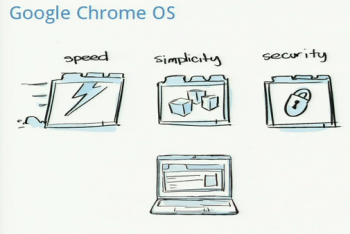
  • Speed
  • Simplicity
  • Security
Apps will be web-based, no installing. They will be tabs of the Chrome browser.

Matt Papakipos took the stage after Pichai to explain the development side of Google's operating system. The OS will have automatic updates, meaning no users are left behind with security vulnerabilities.  Papakipos also explained how Chrome OS will be different from current systems. He explained that if you get a new computer, you just log into Chrome OS on it and all of your data is there for your, waiting.

And here's the downer: "As a comsumer, you cannot download Chrome OS. You have to go buy a device with the system on it." Well that about does it for me. I thought we would be able to download and install Chrome OS. I mean, isn't that what open source is supposed to be about?
Continue on after the break for the Chrome OS event photo collection.


11.17.2009

Google to Hold Event This Thursday Showcasing Chrome OS


The Washington Post sends us word that Google will be holding a Chrome OS event this Thursday, the 19th of November. The event will supposedly involve a "complete overview" of Google's much-anticipated operating system. There will also be more details regarding the release of Chrome OS on netbooks and other hardware next year.

The Post insinuates that next year's launch on specific hardware will be the "complete" launch, making this week's event more of a mere showing. I think earlier predictions of a public beta will hold true and Google should be making Chrome OS available as a download soon after Thursday's event.

The event will be held at Google's California headquarters with Sundar Pichai, Vice President of Product Management at Google, doing the heavy talking. So what do you think? Will we get our hands on the magical Chrome OS the day after tomorrow? Let us hear it in the comments below!

[Via The Washington Post]

11.14.2009

Do You Think It's Too Early for Chrome OS?


Garret Rogers over at ZDNet.com asks "is [the] imminent Chrome OS launch reckless?" He points out that early adopters of the operating system might be disappointed with what they find. Rogers predicts the initial Chrome OS release will be "barebones, bordering on useless".

You might have seen this coming, but we have to respectfully disagree with Mr. Rogers. It has been 4 months since Google announced Chrome OS. And we doubt they have been sitting on their hands. Google has legions of programmers (they did develop Android somehow, right?) that come to work everyday to do Google's Chrome OS bidding.

Four months is a long time to get an operating system together, especially one based on Linux. Just look at Ubuntu. They release a new version every 6 months. Rogers says "releasing 'early' is asking for dissatisfied early adopters". Should Google take a page from Microsoft's book? Wait 5 years like MS did before releasing Windows Vista? Not sure if you've noticed, Mr. Rogers, but that didn't turn out too well for Microsoft...

So we think an early "alpha" build is indicative of a great OS. Let the masses (or the nerds that know how to install OS's) test Chrome OS and tell Google what is wrong with it. Then they can fix it, toss it to some OEMs and get it to the market at large. Then everyone will be happy! So what do you think? Will the first release of Chrome OS disappoint users? Tell us in the comments!

[Read the ZDNet.com post in its entirety here]

Chrome Browser Shows File Managing Skills in Time for Chrome OS


Word comes from Downloadsquad.com that there have been some interesting changes to Chrome for Chrome OS's source code. The recently discovered browser is now showing even more signs of the power it will have in Google's operating system.

Now you can examine your files and directories in Chrome (just as you do with Windows Explorer). To check this out just type these into Chrome: "C:\" (for Windows), "/Users/your_username" (for Mac) or "home/your_username" (for Linux). Now this isn't exactly groundbreaking, since Firefox will do the same thing.

However, Download Squad also points out that the source code now contains a "mount library". This reveals plans to have the Chrome browser mount drives in Chrome OS. So get ready to really do "everything" through your browser in Chrome OS!

[Via Download Squad]

11.13.2009

Google's Chrome OS to Launch Next Week, Sources Say


News comes screeching over the internet that Google's operating system, Chrome OS, will be available for download within a week. The tech scene's golden boy, Michael Arrington of Techrunch.com (sorry Topolsky!), says reliable sources have provided him with this bit of wondrous news.

This version of Chrome OS is most likely the source code that was slated to be "released before the end of year" according to Google's blog. It might not be completely baked and will probably carry the trusty Google "beta" label, or perhaps even an "alpha" label. But how else can a great operating system become fully stable without a band of great community supporters like us?

So get your downloading pants hitched up and break out those OS installation skills because it's getting close. I mean a week? That's like 7 days! Let's just keep our fingers crossed that Chrome OS will work on a large range of hardware, or at least one of our beasts!

11.12.2009

Google Increases Paid Storage, Readying for Chrome OS?


Remember the days when you would often get close to running out of room for your email? Maybe you had to choose which beloved correspondance to keep and which one to trash. Well, it looks like those times are even farther behind us, especially if you use Gmail or other Google services.

The news is spreading across the Internet that Google has revamped its online storage plans. The search giant announced the move in its blog ("Twice the storage for a quarter of the price") and now provides an impressive 20 GB of online storage for $5 a year. Google's blog justifies the increase (it was 10 GB for $5) as a remedy for our ever-growing collections of data.

The company points out that, in addition to wanting to save more emails, it is "easier and cheaper than ever before to take lots of pictures" thanks to digital cameras. The storage will be split between a user's Gmail account and his or her Picasa account, which is Google's photo storage service. There are also larger storage options available from Google, ranging from the aforementioned 20 GB to a massive 16 TB (which would cost you $4,096 per year).

I think this bump in Google's storage seems to point in the direction many companies are going: to the cloud. Google will soon be releasing their own operating system, Chrome OS, which you can read more about here: Google to Make a Computer Operating System. Google has said that Chrome OS will rely heavily on cloud computing. This means that instead of using the power and storage of your computer, the operating system will use Google's own server computers to complete tasks. In other words, a lower-powered, less expensive computer  on your end will get everyday tasks done just as well as high-powered system.

So an increase in Google's online storage now will ensure it is ready for prime time when Chrome OS is released. This will give the company a chance to see how its computers can handle the weight of the cloud. I think it's a great thing that they are doing this now. At least they are not waiting to see what disaster could strike an untested online storage service when millions of users are relying on it.

Chrome Browser for Chrome OS (.deb package)


This Chrome version for Chrome OS was discovered a few weeks ago, but we found that it was somewhat difficult to obtain the actual Chrome for Chrome OS installation package (the .deb file). So we thought we would post up a screenshot of the browser in action (with our chosen theme on it).

Notice the small "x" beside the question mark in the top right-hand corner. This tells you "no networks available" if you hover on it. Just another sign of the power that will be given to the Chrome web browser in Chrome OS. It really will be your go to guy for all interaction with Chrome OS.

Speaking of this being a .deb file, we wonder if Chrome OS will be Debian based (Debian uses .deb files for installing programs, like .exe for Windows and .dmg for Mac) ... We've seen some pretty awesome things done with Debian-based GNU/Linux distributions (like Ubuntu and xPUD). With all the distros that are based on it, we know that Debian can be a very flexible base to Chrome OS. And Chrome OS's completely "new windowing system" will insure that this isn't "just another Linux OS" like many people are predicting.

Here's the .deb file for you Linux users out there: Chrome Browser for Chrome OS .deb package

11.11.2009

Techradar: 10 Things to Know About Google Chrome OS


Techradar.com has an interesting piece about Chrome OS. It covers 10 things that they think you should know about the upcoming operating system. We thought the question "So Microsoft need not worry about competition for Windows 7 then?" was interesting. We would say that MS most definitely does need to worry about Chrome OS. Techradar says "On the plus side for Microsoft, it will have at least 9 months to get market share and persuade people that they don't need an alternative to Windows 7." And they're going to need those 9 months.

Judging from our experience with Windows 7 (which you can read about here), in 9 months people are going to be clawing to get away from Microsoft's prettied-up Vista. It may sound cynical and like we hate Microsoft and Windows, but it's true. We're betting there will be plenty of users looking to Chrome OS to end their buggy, virus-ridden OS days. So check it out, and leave us a comment of anything other predictions about Chrome OS: 10 Things to Know About Google Chrome OS

11.03.2009

Chrome Browser: Fastest of the Browsers, Fastest on Linux


Two separate news pieces come to us today about Google's Chrome browser. Apparently, Chrome is the fastest browser available overall and performs best in its developer build form on GNU/Linux OS's (using X11 windowing system):

From LifeHacker we have this:
"Browser Speed Tests: The Windows 7 Results

Firefox 3.6 Beta 1, like every other browser, makes a claim to being "faster." We took Firefox and all the other latest browsers, put them on Windows 7, and ran them through our human-measured speed tests to vet the bragging." Continue reading at LifeHacker.com

And Slashdot sends word of this:

In a curious contrast to conventional wisdom, there are reports of X11 Chromium being faster than Windows or Mac versions" Continue reading at Slashdot.org

That's good news for us future users of Chrome OS. We'll have a beast of a browser to truck us around in the interwebs at break-neck speed!

10.18.2009

This is Not the Chrome OS Beta


There has been an iso circulating the interwebs posing like it's the beta of Chrome OS. Well it's not, as much as we here at Chrome Techa want it to be. It's merely a build of OpenSuse Linux made with Suse Studio.

Suse Studio is a service were you can make custom build of the Linux distribution OpenSuse. The web application is actually pretty cool. It lets users pick and choose what software will be included in their operating system. It even lets you test it live. We have an account, but if you want one, you have to sign up and be invited. It seems as though Suse is still "adding capacity to SUSE Studio as fast as [they] can".

So some fan (hopefully) has created a "Chrome OS Beta" with SUSE Studio. And it's parading around the nets as the real thing. So when you run on to it, take it from us that it isn't Google's Chrome OS. In the word of the Engadget, it's just a "KIRF".


Even thought this fake was called out long ago, people are still circulating it like it is the real deal. But have no fear! Chrome Techa will bring you the first droplet of news that points to an official iso from Google themselves.

Google Hosts Event Featuring Chrome OS


We here at Chrome Techa have been waiting on our toes for any word on the upcoming Chrome OS from Google. And Thursday of last week, it seems, we were scheduled to find out more.

PC World told us that Google had scheduled an event at their headquarters in Mountain View, California. This event would have apparently shed more light on the enigma that is thus far the Chrome operating system. The event kicked off at 6:00 p.m., presumably Pacific time.

That "leak" the other day must have gotten the old Google a bit flustered. Apparently some snoopers (not us, we would never do such a thing) found a file directory containing a version of the Chrome web browser that is built specifically for Chrome OS. You can read more about thathere.

So, was this the "release of source code in late 2009" that Google so nicely has promised us? We sure hope it was! However, Thursday passed us by and we heard no word from the Big G. Maybe it has something to do with the dis-invitation of the media. For some reason, Google shut down the media's registration process to attend the event. So we're out here in the cold waiting on a bit of news...
Stay tuned for details, we'll post them up as soon as we hear them.


Update: In the mean time, we have something for you! Check out that Chrome web browser build for Chrome OS that was grabbed from Google's development directory. It has a very interesting clock in the window bar, as well as a new logo in the top left corner... Download the Deb file here (installs on Linux OS's): Chrome browser for Chrome OS 
And it appears as though the even is on October 16, not 15. Thanks anyways, PC World!

Update 2: And silence... We're not sure if they actually had a presentation about Chrome OS at the event or not. They seemed to have locked the mainstream media out, with no invitations being sent out. Better luck next time!

8.01.2009

About Chrome OS


So what is Google's Chrome OS? I will let the company that started it tell you more about the operating system, as I believe they can do so best (from the Official Google Blog):

It's been an exciting nine months since we launched the Google Chrome browser. Already, over 30 million people use it regularly. We designed Google Chrome for people who live on the web — searching for information, checking email, catching up on the news, shopping or just staying in touch with friends. However, the operating systems that browsers run on were designed in an era where there was no web. So today, we're announcing a new project that's a natural extension of Google Chrome — the Google Chrome Operating System. It's our attempt to re-think what operating systems should be.

Google Chrome OS is an open source, lightweight operating system that will initially be targeted at netbooks. Later this year we will open-source its code, and netbooks running Google Chrome OS will be available for consumers in the second half of 2010. Because we're already talking to partners about the project, and we'll soon be working with the open source community, we wanted to share our vision now so everyone understands what we are trying to achieve.

Speed, simplicity and security are the key aspects of Google Chrome OS. We're designing the OS to be fast and lightweight, to start up and get you onto the web in a few seconds. The user interface is minimal to stay out of your way, and most of the user experience takes place on the web. And as we did for the Google Chrome browser, we are going back to the basics and completely redesigning the underlying security architecture of the OS so that users don't have to deal with viruses, malware and security updates. It should just work.

Google Chrome OS will run on both x86 as well as ARM chips and we are working with multiple OEMs to bring a number of netbooks to market next year. The software architecture is simple — Google Chrome running within a new windowing system on top of a Linux kernel. For application developers, the web is the platform. All web-based applications will automatically work and new applications can be written using your favorite web technologies. And of course, these apps will run not only on Google Chrome OS, but on any standards-based browser on Windows, Mac and Linux thereby giving developers the largest user base of any platform.

Google Chrome OS is a new project, separate from Android. Android was designed from the beginning to work across a variety of devices from phones to set-top boxes to netbooks. Google Chrome OS is being created for people who spend most of their time on the web, and is being designed to power computers ranging from small netbooks to full-size desktop systems. While there are areas where Google Chrome OS and Android overlap, we believe choice will drive innovation for the benefit of everyone, including Google.

We hear a lot from our users and their message is clear — computers need to get better. People want to get to their email instantly, without wasting time waiting for their computers to boot and browsers to start up. They want their computers to always run as fast as when they first bought them. They want their data to be accessible to them wherever they are and not have to worry about losing their computer or forgetting to back up files. Even more importantly, they don't want to spend hours configuring their computers to work with every new piece of hardware, or have to worry about constant software updates. And any time our users have a better computing experience, Google benefits as well by having happier users who are more likely to spend time on the Internet.

We have a lot of work to do, and we're definitely going to need a lot of help from the open source community to accomplish this vision. We're excited for what's to come and we hope you are too. Stay tuned for more updates in the fall and have a great summer.

Chrome Techa is here to keep you updated on Chrome OS news and events. Feel free to email us at chrometecha@magnatecha.com if you have any questions or comments.